
Home » Download

K888 App Download for Fast, Secure Mobile Play on Android and iOS
Download K888 for fast access, low data use, and trusted mobile logins
K888 app download puts the full platform in your pocket. Load markets fast on mobile data, track cricket in-play, and spin JILI slots with quick taps. Enjoy verified sign-ins, device lock support, and tight security designed for real-world mobile use.
With the K888 mobile app, you get lighter pages, smarter caching, and alerts that arrive on time. Short sessions are enough to check odds, claim an offer, or make a pick before the next over. Trust checks help keep your account and funds safe.
Why the app fits local mobile habits, cricket fans, and secure sign-ins
Stay fast on mobile data, cut steps at login, and keep match markets close. The app is built for short sessions and busy schedules.
Built for real mobile speeds and lighter data use
Pages are optimized to load quickly on 3G/4G. Images compress on the fly, and key markets cache to reduce repeat data.
One-tap login with device lock and two-step checks
Use fingerprint, Face ID, or a PIN. Add two-step verification for extra safety and get alerts on new-device sign-ins.
Cricket-first experience with quick paths to live markets
Open straight to popular cricket events. Switch to scorecards in a tap, then return to odds without losing your place.
JILI slots and live tables always within easy reach
Browse JILI titles, jackpots, and recent picks. Game pages remember your last view for faster return sessions.
Clear trust signals for account and wallet safety
Account name checks, verification prompts, and payment-name match reminders help protect withdrawals and prevent delays.
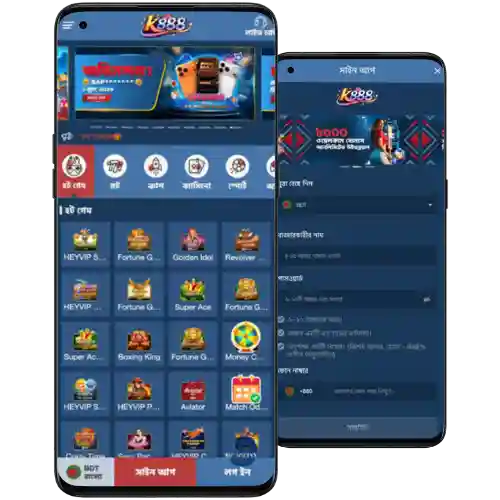
Step-by-step guide to download, install, and start using K888 on mobile
- Open your phone’s browser and make sure you have enough storage space.
- Go to the official K888 site from your browser’s address bar.
- Tap the Download section and choose Android or iOS.
- Android: tap Download to get the latest K888 APK to your device.
- When prompted, allow your browser to install apps from this source, then continue.
- Open the downloaded file and tap Install. Wait for the setup to finish.
- iOS: if an App Store link appears for your region, tap Get. If not, use Safari, tap Share, and Add to Home Screen for the web app.
- Open the app, allow notifications, and choose your preferred language and odds format.
- Log in with your phone or email, or create a new account, then set a PIN or biometrics.
- Complete verification when asked to protect your account and enable smooth withdrawals.
New users can tap K888 Register to create an account in minutes and secure sign-in methods from the start.
After your K888 app download, enable auto-updates and alerts so you never miss cricket odds boosts or limited-time offers.
Quick access buttons for Android APK and iOS home screen install
[Get Android APK] Tap to download the latest build, then install and sign in.
[Set Up on iOS] Tap to open in Safari, then Add to Home Screen for instant access.

Mobile features that save data, speed logins, and keep matches in view
Faster loading and smart caching on mobile data
Key pages cache locally so popular markets open faster. Media compresses to save data without losing clarity.
Quick sign-in with biometrics and smart device checks
Face ID or fingerprint unlock gets you in fast. New-device alerts and session timeouts help protect your account.
Match alerts and event reminders for cricket fans
Get push alerts for toss results, wickets, odds swings, and settled bets during big cricket fixtures.
JILI highlights and jackpot notifications
Receive updates on new JILI slots, featured rooms, and time-limited jackpot drops so you can jump in early.
Cleaner navigation with sticky shortcuts
Sticky tabs keep Home, Cricket, Casino, and Wallet close. Recents let you return to the last event in one tap.
Exclusive app promotions, cricket campaigns, and smart alerts for offers
App users often see early access to odds boosts on key cricket fixtures and targeted reload deals during peak match hours.
Look out for pop-up claim cards and push alerts that highlight time-limited offers. Track progress inside your profile so wagering steps stay clear.
Many campaigns are simple to join, and you may find a K888 bonus available in the app during special events or marquee series.
Safe installation practices, official sources, permissions, and regular app updates
Only install the app from the official path and check the version number before tapping Install. This reduces risk and keeps performance high.
For safest results, download from the K888 Official Website and avoid links shared in random groups or unverified mirrors.
- Review permissions at first launch; camera, storage, and notifications should match features you use.
- Keep auto-updates on so you receive security fixes and new features as soon as they ship.
- Use a strong PIN or biometrics and enable two-step verification in your profile.
- When transacting, make sure your account name matches your payment name to prevent payout delays.
- Avoid public Wi‑Fi for sensitive actions; switch to mobile data or a trusted network.
If anything looks off during install, cancel, clear the file, and fetch a fresh copy from the official source.
K888 app download, installation, updates, and quick troubleshooting questions answered
Is the app free to download on Android and iOS?
Yes. Downloading and installing the app is free. Data charges from your carrier may apply when you download or use features.
How do I install the APK on Android safely?
Download the APK from the official site, open it, and approve the install from your browser. Then launch the app, sign in, and enable updates.
Can I install the app on iPhone if the store link is missing?
If no App Store link is available for your region, open the site in Safari and use Add to Home Screen. You’ll get app-style access with notifications supported via the browser.
Why do I see “Install blocked” during setup?
Android can block installs from unknown sources. Approve the prompt for your browser, retry the install, and confirm the package name and version.
How do I update to the latest version?
Enable auto-updates in Settings or tap Update when prompted in-app. Updating ensures better performance, security patches, and the newest features.
Ready to install and play? Get secure mobile access to K888 today
Install the app now to stay close to live cricket odds and your favorite JILI games. Quick logins, smart alerts, and light pages keep you moving.
Don’t miss key moments or offers during busy days. Download, sign in, and make your next pick with confidence on your phone.